Error in the 3DS guide?

The guide says I should check if there are files like that after extracting nimbus

Ensure your SD card has all the following files

SD:/luma/titles/000400300000BC02/code.ips (Miiverse, JPN)

SD:/luma/titles/000400300000BD02/code.ips (Miiverse, USA)

SD:/luma/titles/000400300000BE02/code.ips (Miiverse, EUR)

SD:/luma/sysmodules/0004013000002F02.ips (SSL)

SD:/luma/sysmodules/0004013000003202.ips (FRD/Friends)

SD:/luma/sysmodules/0004013000003802.ips (ACT/NNID)

SD:/3ds/juxt-prod.pem (Juxtaposition certificate

meanwhile there are no such files in the archive - so I got confused by that
Looking at it, they’ve been gone since the 2.0 release,
thought maybe it just is like that nowadays so I could try out and if that doesn’t work then copy these files from earlier releases, but wasn’t too sure about that so thought I might just ask
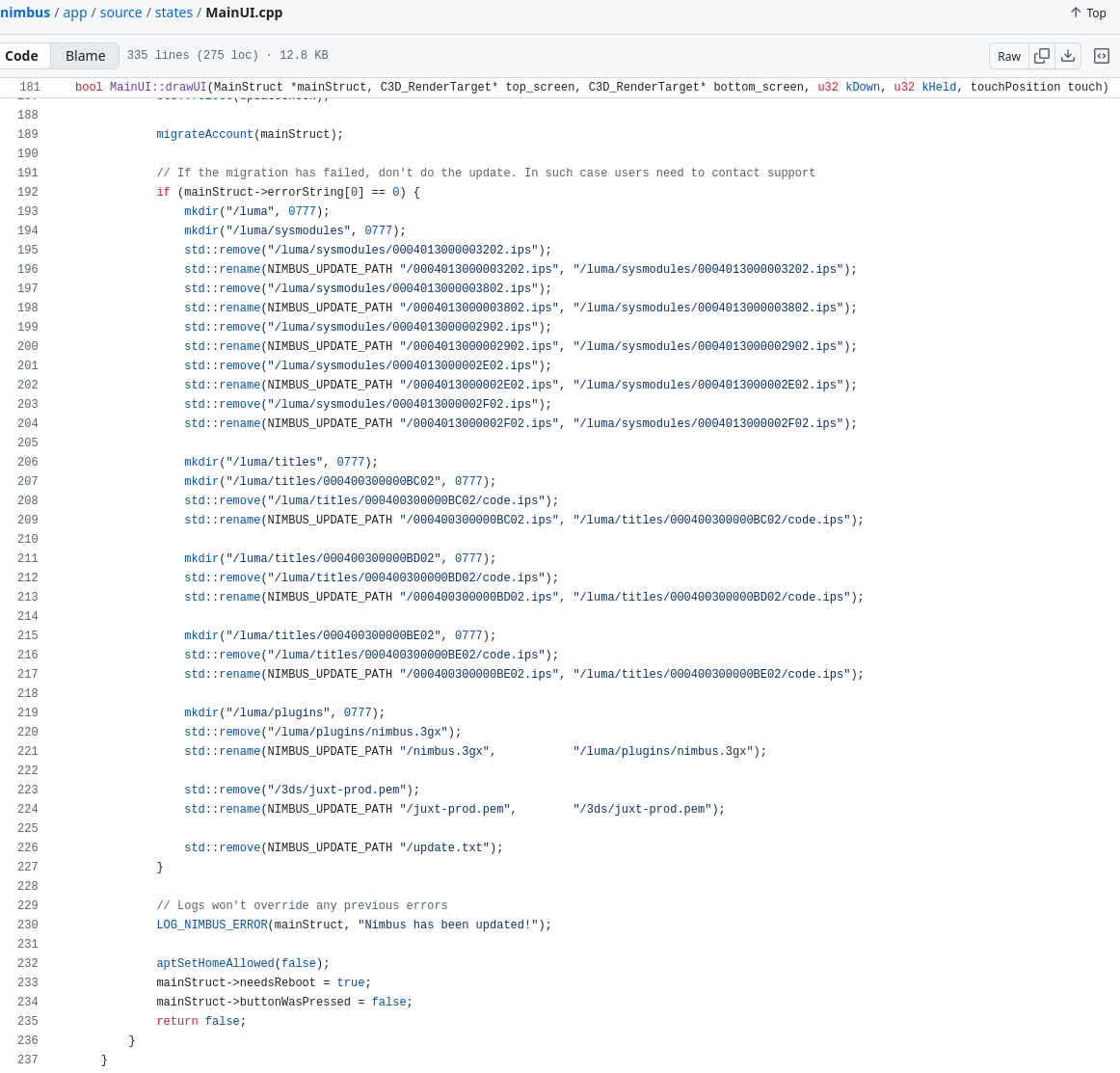
looking at it now, seems like the files might actually be in SD:/3ds/nimbus/update/, which I’m guessing end up in those locations after the app is ran and it’s so someone with old files there doesn’t end up not replacing them when updating, or maybe related to the plugin in there… regardless yeah
Install Nimbus from Universal Updater, NOT manually from Github, as if you do it manually the files also have to be transferred manually.

Universal Updater does it all for you.

The current release is 2.0.2.

The files should not have changed location at the end of the process, because they need to be in a specific place for Luma3DS to actually run them properly.

thanks for the reply
looked at Nimbus | Universal-DB and the downloads there are pretty much the same as the newest github release, wouldn’t think there’s any difference just way easier to update, so I gave this Universal Updater a shot since why not and yep, still no such files (note: still haven’t run the app since guide said I should ensure the files are there and they aren’t)

peeked at the source code, NIMBUS_UPDATE_PATH is /3ds/nimbus/update, there is an update.txt in there, so pretty sure the ips stuff is sitting in there and it gets moved into the correct folders after the app is ran so yeah maybe the guide could use an update for the new release. gonna try just running it and report back

Yes, it works just fine when you run it. The guide is just outdated

1 Like